
Type on your TV in four steps
- Connect to your TVOpen Universal TV Remote Control and tap your TV. Your phone must be on the same Wi-Fi as the TV.
- Select a text field on the TVOn the TV, select the search box or the field you want to fill, so that the TV's on-screen keyboard is open.
- Tap the keyboard buttonIn the app, tap the keyboard button. Your phone's keyboard opens.
- TypeType your text. Depending on your TV, letters appear on the TV as you type, or you type the whole text and tap Send.
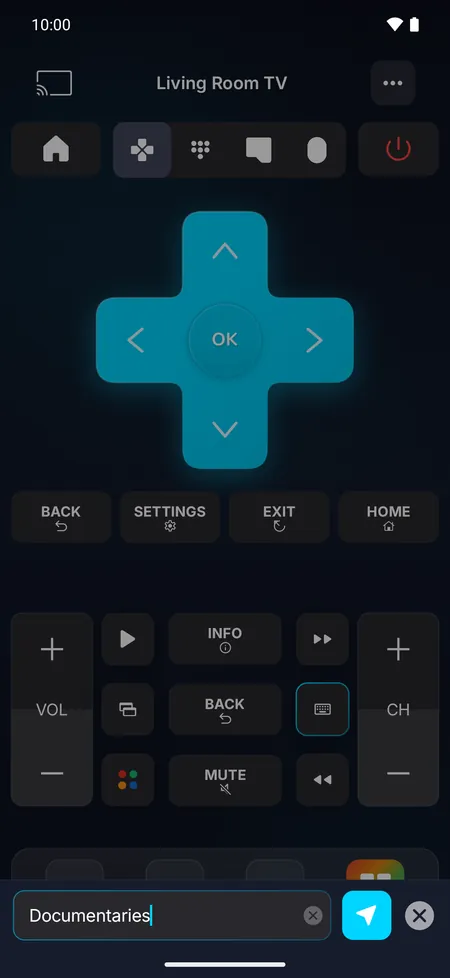
As you type, or all at once
- Letters appear as you type on Roku devices and Vizio TVs.
- Type, then tap Send on Samsung, LG and Sony TVs, Android TV, Google TV and Fire TV: you can check your text before it goes to the TV.
Or just say it: voice search
On LG TVs, Roku, Fire TV, Android TV and Google TV, tap the microphone and speak: your words are typed on the TV. The first time, the app asks for access to the microphone and to your phone's speech recognition, which turns your voice into text.
Tips
- Passwords: type them on your phone, where you can check every character, instead of moving across the on-screen keyboard.
- Nothing appears? Make sure the text field on the TV is selected and its keyboard is open, then send again.
- A typo? Clear the field on the TV and send the text again.
Try it on your TVFree download, no ads. Your phone becomes the remote in a minute.

The iPhone and iPad version is coming soon.
Frequently asked questions
Why doesn't the text appear on my TV?
The TV accepts text only while one of its text fields is active. Select the search box on the TV first so its keyboard opens, then type in the app.
Is the keyboard free?
The keyboard and voice search are part of Pro. You can try the rest of the remote for free.
Can I type on a Hisense VIDAA TV?
No. VIDAA TVs don't accept text from phone apps, so use the direction pad on them.